What Is Shared Hosting? Limits, Fit and Alternatives
By MinniHost Guides Editorial Team Posted Topic: Hosting
Shared hosting means many customer accounts run on one server and divide its processor, memory, disk and network. It is the usual low-effort starting point for a small site because the host maintains the server software. The trade-off is less control and limits that are set in the plan's terms, so read those limits before you buy.

Part of our guide: What Is Web Hosting?
Sources re-opened and compared with this text by the MinniHost Guides team on 2026-11-17.
What is shared hosting in plain terms?
Shared hosting is a hosting type where many customers’ websites run on a single server. It is the simplest kind to use and a common starting point, as described in our overview of what web hosting is.
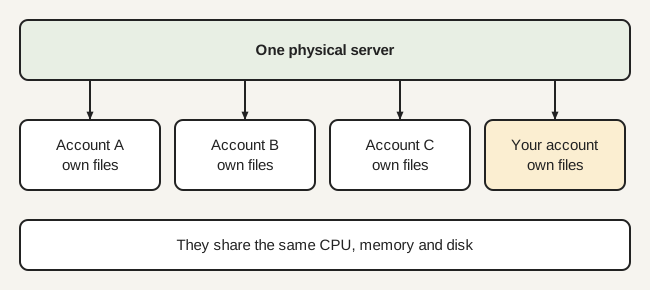
Think of an apartment building: one structure, shared plumbing, separate front doors. Each account has its own files, databases, email and login, usually managed in a control panel such as cPanel. The host runs the building: server hardware, operating system and web server software.
How are the resources divided?
Each account receives a share of the same machine’s storage, processor time, memory and network capacity, and the host sets the share through plan limits. The exact limit types differ by host, so read the plan’s terms.
Look for limits on:
- Storage. In cPanel the quota is shown in Disk Usage, and database sizes count toward it. If you hit the quota you see “Write failed: disk quota exceeded”, and only your hosting provider can raise it.
- Backups near the quota. cPanel notes backups may fail for accounts near or over quota.
- Processes, files, CPU and memory. Whether and how these are capped is set by the host. Ask for the numbers in writing.
- Monthly transfer. Estimate yours with the storage and bandwidth estimator.
- Email sending. Hosts often restrict outgoing mail; see how mailbox hosts handle sending.
What does “unlimited” usually mean?
“Unlimited” on a plan page rarely means no limits at all. A server has finite capacity, so limits tend to appear in the terms of service or acceptable-use policy. Read those documents for anything about files, processes, CPU use or “excessive” usage, and check what happens when you exceed them. Do not rely on marketing text.
Who does shared hosting suit?
It suits brochure sites, small blogs, small WordPress sites and portfolios with modest traffic and no special software needs. It is a poor fit for sites that need custom server software, steady heavy traffic or strict isolation.
- Good fit: low to moderate traffic, standard software, an owner who wants no server upkeep.
- Outgrown: frequent limit warnings, slow pages under load, or a need for software the host does not allow.
How secure is a shared server?
Security is shared between the host and you. The host maintains the server software and separates accounts; you maintain your site’s software, passwords and backups. NIST’s server security guide (SP 800-123) treats securing a server as a continuing maintenance job, which is the part a shared host takes off your hands.
Ask how the host isolates accounts and what happens when another account on the server is compromised. Keep your own backups; the FTC advises regular backups, including copies not connected to your network.
What are the signs you have outgrown shared hosting?
You have likely outgrown it when limit warnings repeat, pages slow down under normal traffic, or the host’s rules block software you need.
- Repeated disk, process or transfer warnings.
- Slow pages that stay slow after you trim plugins and images.
- A requirement for software or settings the host will not provide.
- A need for stronger separation from other customers.
Where to go next
The usual next steps are a VPS (compared in comparing shared plans with a VPS), managed WordPress hosting, or a cloud plan. Compare their total cost with the hosting cost calculator and see WordPress hosting explained if WordPress is your platform. For what drives price, read web hosting cost.
Your questions answered
What does shared hosting mean?
Shared hosting means your site sits on a server with many other customers' sites, and all of them use the same machine's processor, memory, disk and network connection. Each customer gets a separate account with its own files and login. The host looks after the operating system and server software, so you manage only your own site.
Is shared hosting safe for a business site?
It can be, provided the host separates accounts, keeps server software patched and you keep your own site software updated and backed up. The risk is that you do not control the server, so ask the host how accounts are isolated and who patches what. For stricter needs, consider a VPS or managed plan.
How many sites can share one server?
There is no standard number. The host decides how many accounts to place on each server, and it is usually not published. What matters to you are the limits written into your plan, such as storage, files, processes and monthly transfer. Read the terms and ask support if a limit is not stated clearly.
Does unlimited shared hosting really have no limits?
Treat the word with caution. Every server is finite, so an unlimited plan usually carries limits somewhere, often in the acceptable-use or fair-use terms rather than on the pricing page. Before you buy, read those terms for caps on files, processes, CPU use and email sending, and ask support to confirm anything unclear.
When should I move from shared hosting to a VPS?
Consider it when your site regularly hits plan limits, you need software the host does not allow, or you want more isolation, and you can take on server administration. If you only want faster WordPress without upkeep, a managed WordPress plan may fit better than a VPS, which makes patching your job.
Where this comes from
- cPanel documentation: Disk Usage (docs.cpanel.net)
- NIST SP 800-123: Guide to General Server Security (csrc.nist.gov)
- Apache HTTP Server documentation (httpd.apache.org)
- What Is Web Hosting?
Web hosting explained in plain English: what a host provides, how shared, VPS, cloud and managed hosting differ, and what a small site needs.
- WordPress Hosting Explained: Types and Requirements
WordPress hosting explained: what WordPress needs from a server, how shared, VPS, managed and cloud options differ, and WordPress.org vs WordPress.com.
- How to Host a WordPress Website: Step by Step
How to host a WordPress website: what you need, choosing a hosting type, installing WordPress, turning on HTTPS, backups and first-launch troubleshooting.
- How to Choose a Web Host: A Neutral Checklist
A neutral checklist for choosing a web host: what your site needs, versions, backups, security, support and exit terms, with no rankings or affiliates.
- Managed WordPress Hosting: What You Get
What managed WordPress hosting usually covers, what it does not, common restrictions and questions to ask, compared with shared and VPS hosting.
- Self-Hosted WordPress vs WordPress.com Hosting
Self-hosted WordPress (WordPress.org software) versus WordPress.com: who hosts, who updates, plugin limits, ownership and what a host must provide.