Email With Your Own Domain: How It Works
By MinniHost Guides Editorial Team Posted Topic: Email
Email on your own domain means addresses like you@yourbusiness.com instead of a free webmail address. You need a domain you control, a mailbox provider that stores the mail, and the settings that point the domain's mail to that provider. The provider can be your web host, a dedicated email host or a service you already use.

Sources re-opened and compared with this text by the MinniHost Guides team on 2026-11-17.
What is email on your own domain?
It is an email address whose part after the @ is your own domain, such as you@yourbusiness.com, rather than a shared webmail domain. RFC 5321 defines the standard mailbox form as local-part@domain. To understand the second part, read what an email domain is.
What do you need?
You need three things: a domain you control, a mailbox provider and the connection between them. The domain’s mail settings tell other servers where to deliver messages for your address. How domain registration and DNS records work is outside this site; follow your provider’s instructions for the settings.
The provider can be your web host (see what web hosting is), a dedicated mailbox service (see the email hosting guide), or a bundled service.
Three ways to host the mailboxes
See the table above. Web host mailboxes are convenient, since cPanel’s tools include Email Accounts alongside the site, as described in what cPanel is. Dedicated email hosting keeps mail separate from the site. Free-tier services come with provider-set limits.
Setup in five steps
- Pick the provider using the table and your needs; a small business with a site may start with web hosting that includes mailboxes.
- Create the mailbox in the provider’s dashboard or panel.
- Apply the provider’s mail settings to your domain, following their instructions exactly.
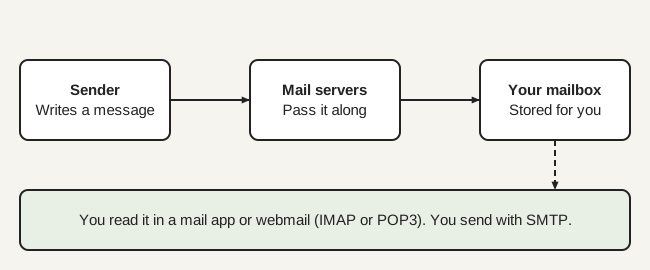
- Connect your mail app or webmail using the incoming and outgoing server details the provider gives you.
- Test by sending to and from another provider, and check spam folders.
Security basics
Use encrypted connections, strong passwords and multi-factor authentication, and watch for phishing. RFC 8314 recommends TLS 1.2 or later between mail clients and submission servers, and Implicit TLS for POP, IMAP and SMTP submission (default ports 995, 993 and 465). It says clients and servers should support both STARTTLS on port 587 and Implicit TLS on port 465 during a transition period.
The FTC advises passwords of at least 12 characters, MFA, confirming emailed wire-transfer requests by calling a number you know is correct, and making sure your email provider has SPF, DKIM and DMARC. Never reuse your mail password elsewhere.
Limits of email on a web host
Mailboxes on a web host share the account with the site, and hosts often cap outgoing mail. A compromised site can also affect mail on the same account. If email is critical, consider separate hosting. Check the plan’s terms for sending limits and storage.
Next steps
Read hosted mailbox services explained, then compare costs with what hosting costs.
Common mistakes
- Creating the mailbox but never testing delivery from an outside account.
- Leaving the only admin login with one person.
- Using the same password for mail and for the hosting account.
- Deleting the old mailbox before you have confirmed the new one receives mail.
- Forgetting to update the mail app on every phone and laptop after a change.
Questions to ask a provider
- How much storage does each mailbox get, and what is the attachment size limit?
- Is there a cap on messages sent per hour or per day?
- How do I export my mail if I leave?
- Is multi-factor authentication available for every mailbox?
| Option | Where mailboxes live | Control | Watch for |
|---|---|---|---|
| Web host mailboxes | On your web hosting account | Managed in the same panel as the site | Sending limits; mail and site share one account |
| Dedicated email hosting | A separate mail service | Mail separate from the website | A second service to manage and pay for |
| Free-tier or bundled service | A provider's own mail platform | Set by the provider | Terms, storage and feature limits |
If you already have web hosting with mailboxes and low volume, start there. Choose separate email hosting when email is critical or you want mail independent of the website.
All Email guides
- Email Hosting Explained: What It Is and When You Need It
Email hosting stores your mailboxes and handles sending and receiving. Learn how it differs from web hosting email, IMAP vs POP3, and a security checklist.
- What Is an Email Domain? The Part After the @
An email domain is everything after the @ in an address. See how an address is built, free vs custom domains, and why a business uses its own.
Your questions answered
How do I get an email address with my own domain?
You need a domain you control and a mailbox provider. Create the mailbox with the provider, then set the domain's mail settings to point at that provider, following their instructions. Test by sending and receiving. The same company can supply the web hosting, the domain and the email, or they can be separate.
Do I need web hosting to have domain email?
No. Email and website hosting are separate services. You can have mailboxes without a website, and a website without mailboxes. Many web hosts include mailboxes, which is convenient, but a dedicated email service works with a domain even if your site is hosted elsewhere or is not built at all.
Is domain email free?
It depends on the provider. Some web hosting plans include mailboxes in the plan price, and some mail services have free tiers with limits, but the domain itself is a separate cost and this guide does not cover it. This site quotes no prices; compare the full yearly cost, including renewals, with the cost calculator.
What is the difference between email hosting and web hosting?
Web hosting stores and serves your website's files. Email hosting stores your mailboxes and handles sending and receiving mail through protocols such as IMAP and SMTP. They may share a company or even a server, but they are different jobs, and either can be moved without moving the other.
Can I use Gmail with my own domain?
Some providers, including large webmail services, offer plans that run mailboxes on your own domain, and you can often forward or fetch mail from a domain mailbox into a webmail app. The terms and setup differ by provider, so check the provider's own documentation for current options and limits.
Will my domain email land in spam?
It can if the domain lacks proper authentication or the sending server has a poor reputation. The FTC advises making sure your email provider supports the email authentication tools SPF, DKIM and DMARC. Keep volumes modest on shared servers and send test messages to several providers. The technical records are covered by a sibling topic, not here.
Where this comes from
- RFC 5321: Simple Mail Transfer Protocol (rfc-editor.org)
- RFC 8314: Cleartext Considered Obsolete: Use of TLS for Email Submission and Access (rfc-editor.org)
- FTC: Cybersecurity for Small Business (ftc.gov)
- cPanel & WHM documentation (docs.cpanel.net)
- Email Hosting Explained: What It Is and When You Need It
Email hosting stores your mailboxes and handles sending and receiving. Learn how it differs from web hosting email, IMAP vs POP3, and a security checklist.
- What Is an Email Domain? The Part After the @
An email domain is everything after the @ in an address. See how an address is built, free vs custom domains, and why a business uses its own.