What Is a CSR for an SSL Certificate?
By MinniHost Guides Editorial Team Review by MinniHost Guides Editorial Team Last checked Posted Topic: SSL & HTTPS
A CSR, or certificate signing request, is a small file you send to a certificate authority to ask for an SSL certificate. It contains your public key, the names you want covered and some identifying details, signed with your private key. The private key itself is never inside the CSR and must stay on your side.

Part of our guide: What Is an SSL Certificate? How HTTPS Works
General information, not professional security or financial advice. Check your host’s and certificate authority’s current documentation; steps differ by provider.
A CSR, short for certificate signing request, is how you ask a certificate authority to issue an SSL certificate for your domain. It carries your public key and the names to cover, and it proves you hold the matching private key. This page supports our guide to what an SSL certificate is and covers what goes in a CSR, how to make one and how to check it before you send it.
What is a CSR in one paragraph?
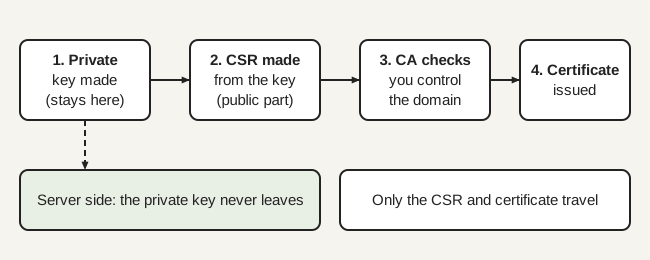
A CSR is a standard request file, defined in RFC 2986, that holds a distinguished name, a public key and optional attributes, signed by the requester. A certificate authority (CA) reads it, checks that you control the domain, and signs a certificate built from it. You keep the private key; the CA never sees it.
What goes in a CSR and what does not?
A CSR contains your public key, the subject details and the requested names. It does not contain the private key. RFC 2986 says the request is signed by the entity requesting certification, which is how the CA knows you hold the matching private key without receiving it.
| In the CSR | Not in the CSR |
|---|---|
| Public key | Private key |
| Subject (organization, country and similar details, depending on the CA) | The CA’s signature (added later, in the certificate) |
| Requested names, as subjectAltName entries | Validity dates (the CA sets them) |
| Signature made with the private key | Anything that is secret |
The names matter most. RFC 9525 says the Common Name must not be used to identify a service, so put every domain you want covered in the subjectAltName list, including the main one. The CA/Browser Forum sets the maximum certificate lifetime, which is 200 days for certificates issued on or after 15 March 2026 and before 15 March 2027 (Baseline Requirements v2.3.1, section 6.3.2), so the CA, not the CSR, decides the dates.
How is a CSR generated?
You can generate one in a control panel or with OpenSSL, and either way you also create a private key. If a hosting control panel does it, the key stays on that server. In cPanel’s SSL/TLS area, the documentation says you must first have or generate a key, then select it, fill in the fields and click Generate. It also warns that a lost private key cannot be recovered.
With OpenSSL, the req command makes both in one step. This example, adapted from the OpenSSL documentation, creates a new RSA 2048-bit key and a CSR with a subjectAltName:
openssl req -new -subj "/CN=example.com" \
  -addext "subjectAltName = DNS:example.com,DNS:www.example.com" \
  -newkey rsa:2048 -keyout key.pem -out req.csr
The -keyout file is your private key and -out is the CSR. Add -noenc only if you understand that the key will then be stored unencrypted; otherwise OpenSSL encrypts it. Send only req.csr to the CA.
If you use an ACME client with Let’s Encrypt, you rarely handle a CSR yourself, because the client builds it during issuance. See our Let’s Encrypt guide.
How do I read a CSR before I submit it?
Print it in readable form and verify its signature:
openssl req -in req.csr -text -verify -nooutCheck that the subject is right, that every name you need appears in the subjectAltName list and that the key type and size are what you intended. A wrong name means a wrong certificate, and fixing it means a new request.
What are the common CSR mistakes?
- Leaving the www name out. List both
example.comandwww.example.comif both are used. - Relying on the common name. Modern clients check the SAN list, so a name only in the common name may fail.
- Mixing up files. The key and the CSR are different files; only the CSR goes to the CA.
- Losing the private key. Without it the issued certificate is useless and cannot be recovered. Generate a new key and CSR.
- Using a CSR for names you do not control. The CA will refuse it at validation.
What does the CA do with it?
The CA validates that you control the names, then signs a certificate for the public key and names in your request. The level of checking depends on the certificate type; see SSL certificate types. You then install the certificate with the private key that matches it, as described in installing and verifying the certificate.
How do I keep private keys safe?
Treat the private key like a password to your site’s identity. Keep it on the server, restrict who can read it and never send it to anyone.
What not to do
- Do not paste a private key into any website, chat, ticket or tool, including the decoder on this site, which needs only public certificates.
- Do not email a private key or store it in a shared drive.
- Do not disable certificate verification to work around an error caused by a key mismatch.
Sources re-opened and compared with this text by the MinniHost Guides team on 2026-11-17. The team holds no engineering licence or vendor certification.
Your questions answered
What does CSR stand for?
CSR stands for certificate signing request. It is a file, defined in RFC 2986 as a certification request, that holds a public key, a distinguished name and optional attributes, signed by the person requesting the certificate. You send it to a certificate authority, which uses it to produce your SSL certificate.
Is the private key part of the CSR?
No. The CSR contains the public key and is signed with the matching private key to show that you hold it, but the private key itself is not included. Never send or paste a private key to a certificate authority, a support agent or a website. If one is exposed, treat it as compromised and generate a new pair.
Can I reuse a CSR?
A CSR is just a signed request, so a certificate authority may accept the same one again, but this is the authority's decision, so check its documentation. Many administrators generate a fresh key and CSR at each renewal so an old key does not stay in use. If the names or key type change, you need a new CSR.
What is a common name versus a SAN in a CSR?
The common name is a free-text field in the subject, while subject alternative names (SAN) are a typed list of the domain names you want covered. RFC 9525 says clients must not use the common name to identify a service, so list every name as a SAN, including the main one. Most tools now ask for SANs.
How do I check what is in my CSR?
With OpenSSL, run openssl req -in file.csr -text -verify -noout. The -text option prints the request in readable form, -noout hides the encoded block and -verify checks the request's own signature. Confirm the subject, the SAN list and the key type before you submit it. A control panel may also show the CSR you generated.
Where this comes from
- RFC 2986: PKCS #10 Certification Request Syntax Specification (rfc-editor.org)
- RFC 5280: Internet X.509 Public Key Infrastructure Certificate and CRL Profile (rfc-editor.org)
- RFC 9525: Service Identity in TLS (rfc-editor.org)
- OpenSSL documentation: openssl-req (docs.openssl.org)
- CA/Browser Forum: Baseline Requirements for TLS Server Certificates, version 2.3.1 (4 October 2026) (cabforum.org)
- cPanel documentation: SSL/TLS (docs.cpanel.net)
- Let's Encrypt: How It Works (letsencrypt.org)
- What Is an SSL Certificate? How HTTPS Works
An SSL certificate links a website's public key to its domain name so browsers can encrypt traffic and check who they reach. How it works, what it proves
- How to Get an SSL Certificate for Your Website
Get an SSL certificate: check your host, use automatic issuance or buy one, install it, force HTTPS and fix mixed content, with WordPress notes.
- Let's Encrypt: Free SSL Certificates Explained
Let's Encrypt issues free, automated, domain-validated SSL certificates. How ACME issuance and renewal work, the limits, and how free compares with paid.
- How to Renew an SSL Certificate Before It Expires
Renew an SSL certificate before it expires: check the end date, fix failed automatic renewals, renew a purchased one and plan for shorter lifetimes.
- What Is an SSL Certificate Chain? Root and Intermediate
An SSL certificate chain links your site's certificate through intermediates to a trusted root. What to send, common errors and how to fix them.
- SSL Certificate Types: DV, OV, EV, Wildcard, SAN
SSL certificate types differ in validation (DV, OV, EV) and coverage (single, wildcard, multi-domain SAN). Compare them and see which suits a small site.